QR Ordering System for Restaurants in India: Complete 2026 Guide
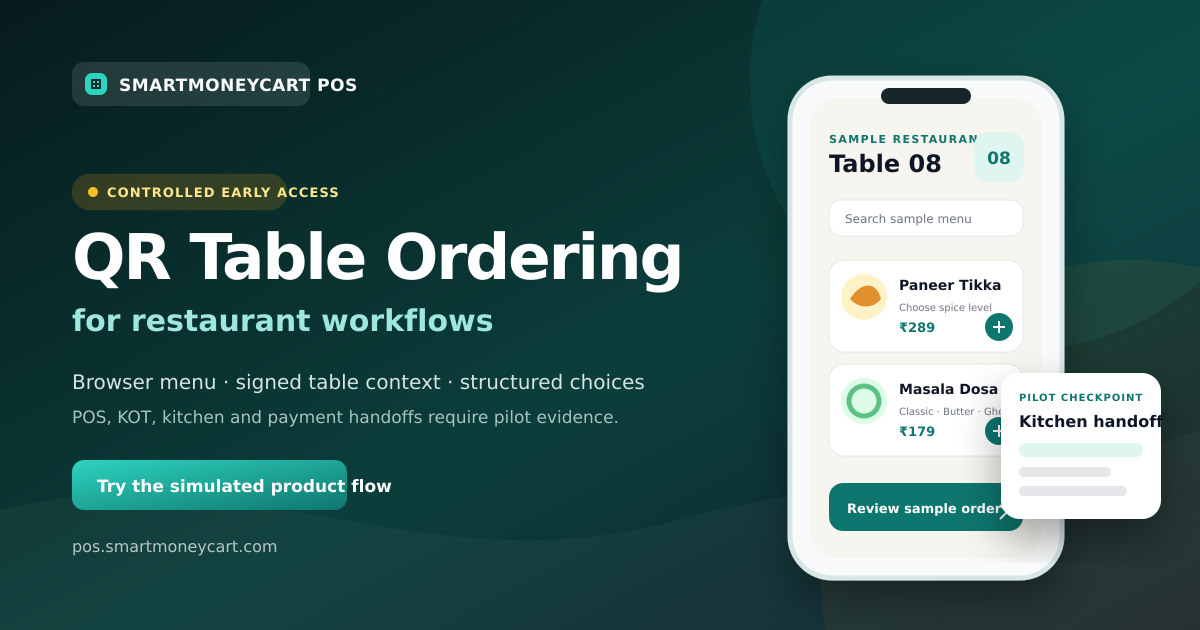
A practical, evidence-conscious guide to table QR codes, guest ordering, POS and kitchen handoffs, billing, privacy and rollout planning.
Quick answer: A QR ordering system lets restaurant guests scan a table QR code, open a digital menu in their phone browser and choose items without downloading an app. What happens after they choose depends on the restaurant's enabled workflow. A complete implementation may connect the request with staff, POS, kitchen and billing processes, but each handoff must be tested rather than assumed.
For an Indian restaurant owner, the important decision is not whether a QR code looks modern. It is whether the full ordering journey fits the way the outlet serves guests, manages tables, updates its menu and handles exceptions.
SmartMoneyCart has a browser-based QR table ordering implementation in controlled early access. The public demonstration is simulated. POS order creation, KOT, kitchen display and online payment are not advertised as generally available until they are verified in the target outlet.
What is a restaurant QR ordering system?
A restaurant QR ordering system is a digital ordering journey opened through a QR code. The code can represent the restaurant, a service area or a specific table. After scanning it, the guest sees a browser menu and can choose items according to the options the restaurant has configured.
The useful part is the workflow behind the square image. A restaurant may need the system to identify the correct table, show available items, collect size or add-on choices, validate current prices, pass a request to staff, and keep a clear record for billing. A code that only opens a PDF does none of those things by itself.
This is why owners should evaluate a restaurant QR ordering system as an operating process, not as a menu-design purchase.
Is a QR menu different from QR ordering?
Yes. A QR menu usually answers “What can I order?” A QR ordering system also answers “How do I send my selections to the restaurant?”
A static QR menu may open a PDF or image. It is simple, but the restaurant has to replace the file when prices or items change. A managed digital menu can be easier to update and can show richer descriptions or availability. Neither necessarily accepts an order.
QR ordering adds item selection, quantities, modifiers, notes and an order-submission step. An integrated system may then connect that request to the restaurant POS or kitchen workflow. The presence of an “Order” button is not proof that these downstream steps work.
Read the detailed QR menu versus QR ordering comparison before deciding how much workflow your outlet actually needs.
How do table-specific QR codes work?
A table-specific QR code contains or resolves to a safe identifier for one configured table. When the guest scans it, the system should show the restaurant and table context before the guest selects anything.
That context matters because “one masala dosa for Table 4” is operationally different from an anonymous item request. Stable table identity helps staff understand where the request came from and helps avoid asking the guest to type a table number that can be mistyped.
A sound setup should answer these questions:
- Is the table name in the system the same as the name printed in the restaurant?
- Does the customer screen show enough context to notice a wrong scan?
- Can staff regenerate or disable a code if a card is copied, damaged or moved?
- What happens when two phones at the same table submit requests?
- How are additional rounds kept with the right table bill?
- Can the restaurant keep a staff-assisted ordering path?
SmartMoneyCart's early-access code uses signed, table-specific tokens rather than putting an internal tenant ID directly in the public URL. That implementation detail still needs a real outlet acceptance test before activation.
What journey does the restaurant guest follow?
The simplest customer journey has four steps:
- The guest scans the code placed at the restaurant table.
- A mobile-friendly digital menu opens in a supported browser.
- The guest reviews items, chooses quantities and selects any required options.
- The order continues according to the restaurant's enabled configuration.
The last line is deliberately conditional. Some systems may only send a request for staff review. Others may create an operational order, offer counter payment or connect an enabled payment provider. Restaurant owners should ask a vendor to demonstrate the exact configured path, including failures and corrections.
The screen should make item names, prices, dietary information where maintained, variants and add-ons easy to understand. Before submission, the guest should be able to review the cart and see the restaurant and table context. A clear way to ask a person for help remains important.
What happens on the restaurant side?
The restaurant-side workflow begins before the first scan. Someone must own the menu, table map, staff process and exception log.
When a request arrives, the restaurant needs to know who reviews it, how the table is verified, how unavailable items are handled and when the request becomes an accepted order. If staff can also take orders, both paths must avoid creating duplicate bills or kitchen tickets.
A practical responsibility map might look like this:
- Owner or manager: controls rollout, menu ownership and reporting checks.
- Cashier or waiter: recognises new requests, confirms exceptions and keeps the bill accurate.
- Kitchen team: receives legible item names, quantities, modifiers and notes through the verified handoff.
- Guest: reviews selections and can switch to staff-assisted service when needed.
Technology does not remove these responsibilities. It changes where information is entered and how it moves.
How should QR ordering connect with restaurant POS?
The main reason to consider a POS-linked workflow is to avoid maintaining separate menu and order records. Ideally, the system should use an authoritative menu, validate item availability and price on the server, and create or update an operational order only after the supported acceptance rules pass.
During a vendor demonstration, verify:
- whether QR and counter billing use the same menu source;
- how table identity appears on the POS screen;
- whether variants, add-ons and notes remain attached to the right line item;
- how duplicate submissions and additional rounds are handled;
- when a request becomes part of the bill;
- how corrections, cancellations and refunds work;
- what record can be exported for review.
SmartMoneyCart's standard restaurant POS software includes billing and restaurant operating workflows. Its QR-to-POS path remains part of controlled early-access validation, so a restaurant should request a target-outlet walkthrough rather than infer availability from the standard POS plan.
How does the kitchen workflow fit?
Kitchen integration is a separate acceptance checkpoint. A guest successfully submitting a cart does not prove that the right items reached the right preparation station.
Test one initial order and at least one additional round. Compare the table, item, quantity, modifier, cooking note and order reference across the guest confirmation, staff view and kitchen output. Then test an unavailable item, a correction and a duplicate attempt.
If the restaurant uses a printer, test the actual printer. If it uses a kitchen display system, observe the real screen and status behaviour. Ask whether updates use polling or another method; avoid assuming that “live” means an instantaneous, guaranteed handoff.
SmartMoneyCart has KOT and kitchen-display code paths, but the QR-to-kitchen behaviour is not a public production claim until the target environment records matching evidence.
What billing and payment questions should owners ask?
Ordering and payment are related but distinct. A restaurant can accept a digital order and still collect cash, card or UPI through its normal counter process. Online payment requires provider configuration, verified status, settlement ownership, refunds and reconciliation.
Before enabling any payment choice, document:
- when the bill is created;
- which prices and taxes are authoritative;
- how staff distinguish initiated, verified, failed and expired attempts;
- what happens if a customer pays after an order attempt has expired;
- who owns settlement and refund review;
- how counter payment is recorded;
- how daily payment totals are reconciled.
Do not choose a system because a sales page displays a payment logo. Ask for a target-account test using the outlet's intended provider and operating process. SmartMoneyCart does not currently advertise online QR payment as generally available.
For tax fields and invoice output, use representative bills and have the business owner or tax adviser review the configuration. The GST billing software guide explains the wider billing workflow without treating software as tax advice.
What are the practical advantages of QR ordering?
The potential benefits depend on good setup and restaurant fit. They should be measured using the outlet's own data, not copied from an industry percentage.
- A browser-based guest option: customers can use a supported phone without installing a restaurant app.
- Structured choices: required sizes, variants and add-ons can be presented before submission.
- Table context: a table-specific code can reduce manual table-number entry.
- Menu maintenance: a managed menu can be updated without reprinting the QR code, subject to the product setup.
- Order review: guests can review their selections before they send a request.
- A consistent source: a POS-linked design can reduce duplicate menu maintenance when the integration is verified.
- An additional service path: QR can sit alongside waiter or counter ordering instead of replacing it.
Measure outcomes such as menu correction time, exception count, wrong-table incidents and staff handling time during a pilot. Do not assume the outcome in advance.
What are the disadvantages and risks?
QR ordering is not automatically suitable for every guest or service model.
- The guest needs a working phone, camera, browser and connectivity.
- Small screens can make a poorly structured menu harder to browse.
- Some guests prefer a person or need accessibility support.
- Wrong table cards or copied codes can create confusion without visible context.
- A separate digital catalogue can drift from the billing menu.
- Staff may miss requests when ownership and alerts are unclear.
- Kitchen errors can still occur if modifiers or additional rounds do not survive the handoff.
- Online payment adds failure, settlement, refund and reconciliation states.
- QR cards need cleaning, inspection and replacement.
Keep printed or staff-assisted alternatives where the outlet and its customers need them. A service design should not punish a guest for choosing human help.
Where does QR ordering work well?
It tends to be easier to evaluate when the menu is structured, table identity is stable and staff already follow a clear order-acceptance process.
Restaurants can use it as an optional dine-in path. Cafes can test repeat drink orders and modifiers. QSRs can evaluate table or collection identification. Food courts need particularly clear collection and seating rules. Fine-dining restaurants may choose a limited menu-viewing or repeat-order role so staff guidance remains central.
Cloud kitchens usually do not have restaurant tables, so table QR ordering may not be relevant. A QR code can still open a direct menu or campaign journey, but delivery address, fulfilment and payment are different problems and should not be presented as table ordering.
What should be on a restaurant implementation checklist?
Use this minimum checklist before a public rollout:
- Document the service model and the problem QR ordering should solve.
- Clean the menu, prices, categories, variants, add-ons and availability rules.
- Create one stable name for every participating table.
- Define staff ownership for incoming requests and exceptions.
- Generate, label and scan-test every code on real phones.
- Test the same table from two phones.
- Test the initial request, an additional round and a correction.
- Verify POS and kitchen fields end to end where those handoffs are enabled.
- Verify each payment state only where outlet-specific payment is enabled.
- Train staff on a clear fallback and customer-help path.
- Start with one table or a controlled service period.
- Record incidents and expand only after the acceptance checklist passes.
The full step-by-step QR ordering setup guide turns these points into a launch plan.
What security and privacy checks matter?
A public QR journey should expose only the information a guest needs. Avoid identifiers that reveal internal tenant or database details. Use tamper-resistant table context, validate prices and availability on the server, bound free-text fields, and protect order creation against accidental retries.
The restaurant should also decide which customer details are necessary. Do not collect a phone number, email address or marketing consent merely because the interface can ask for it. Explain why information is needed, limit staff access and define retention and deletion handling in the restaurant's privacy process.
Physically inspect printed cards. A sticker placed over a genuine QR code can direct a guest elsewhere. Show the restaurant name and table context after scanning so the guest has a chance to notice a mismatch.
How should an owner evaluate SmartMoneyCart?
Start with the SmartMoneyCart QR ordering early-access overview and try the clearly labelled browser demonstration. Then compare the QR workflow with the outlet's existing menu, staff, billing and kitchen process.
The Professional POS trial is useful for evaluating plan features, but it does not itself activate the separately controlled QR pilot. Review current SmartMoneyCart POS pricing, test the standard restaurant workflows you need, and request QR ordering access for a controlled table-to-operations review.
Educational evaluation comes first: choose the smallest workflow that solves a real service problem, keep human help available and require evidence for every downstream claim.
Start Free Forever · Read more SmartMoneyCart guides
By Adarsh Osle · Published 2026-08-09T00:00:00.000Z · Updated 2026-08-09T00:00:00.000Z
Quick answer
Quick answer: Learn how restaurant QR ordering works in India, how it differs from a QR menu, and what to check before connecting tables, POS, kitchen and billing. SmartMoneyCart POS connects this topic to practical billing, GST invoices, KOT, staff controls, payment reconciliation and owner reports for Indian restaurants, cafes, cloud kitchens, kirana stores and retail businesses.
Key takeaways
- Use this topic as an owner checklist, not just a reading exercise.
- Test GST invoices, KOT, WhatsApp invoices, staff permissions and day-end reports before changing POS software.
- SmartMoneyCart POS includes a Free Forever Starter plan with unlimited billing and orders.
How to use this QR Ordering guide
This article is written for Indian restaurant, cafe, cloud kitchen, kirana and retail owners who need practical decisions rather than generic POS advice. Use it as a working checklist during billing setup, menu review, GST reporting, staff training or day-end reconciliation.
The core idea behind "QR Ordering System for Restaurants in India: Complete 2026 Guide" is simple: every operational topic should connect back to measurable owner controls. A POS system should help you see what sold, who billed it, how it was paid, whether GST was correct, which items leaked margin and what action is needed tomorrow morning.
For a small outlet, even a tiny daily mismatch becomes meaningful over a month. A ₹300 payment mismatch, a ₹500 wastage leak or a few unapproved discounts can become a larger problem than a marketing campaign can fix. That is why the article connects the topic back to billing reports, audit trails and weekly review habits.
Owner checklist
- Check the last seven days of item sales and identify the top five profit drivers.
- Compare UPI, cash, card and delivery-channel totals before closing the day.
- Review void bills, discounts and refunds by staff member.
- Confirm GST invoices include correct customer, HSN/SAC and tax details.
- Link the lesson from this article to one specific POS report you will check weekly.
Example calculation for owners
| Metric | Example | Decision |
|---|---|---|
| Daily sales | ₹18,000 | Compare against item mix and staff shift. |
| Discount leakage | ₹650/day | Audit staff permissions and coupon use. |
| Payment mismatch | ₹420/day | Reconcile UPI/cash/card before closing. |
| Monthly impact | ₹12,600+ | Fix process before adding more marketing spend. |
Related SmartMoneyCart resources
- restaurant POS software for billing, KOT and owner reports.
- restaurant POS evaluation guide for buying criteria.
- POS software under ₹500/month for plan evaluation.
- GST billing software for invoice fields, HSN/SAC and report exports.
- cloud kitchen POS software margin guide for delivery-first operators.
Frequently asked questions
- What is a QR ordering system for restaurants?
- It is a browser-based ordering journey that starts when a guest scans a restaurant or table QR code, opens a digital menu, selects items and continues through the ordering steps enabled by that restaurant.
- Is a QR menu the same as QR ordering?
- No. A QR menu can stop after displaying menu information. QR ordering also lets the guest select items and submit or continue an order according to the supported workflow.
- Does SmartMoneyCart QR ordering automatically send KOTs or collect online payments?
- Those are not public availability claims. SmartMoneyCart QR ordering is in controlled early access, and POS, KOT, kitchen and payment handoffs must be verified for the target outlet before activation.
- Do restaurant guests need to install an app?
- The SmartMoneyCart early-access guest experience is designed to open in a supported phone browser, so the public demonstration does not require a customer app.